
A theme built with bloggers in mind. Faber is easy to customize, lightweight, 2 column, widget ready, SEO optimized, and a fast loading WordPress theme.
Faber by JustFreeThemes.com

A theme built with bloggers in mind. Faber is easy to customize, lightweight, 2 column, widget ready, SEO optimized, and a fast loading WordPress theme.
Surfarama is a bold and fun theme which uses the popular mason style layout on the home page and category pages to highlight imagery and make for a very visual presentation. It’s perfect for travel and magazine style blogs heavy on the imagery. The theme is highly customizable with the ability to upload your own logo, set the background color (or image), the primary theme color and even color code the categories without any coding required.

Duena is a Bootstrap template designed specifically for personal blogs. Being Bootstrap-powered the template provides lots of opportunities for editing and tuning. Bootstrap is web developer’s ‘mana’ with all those HTML elements, components and other cool stuff. Even though Bootstrap templates are mostly flat, the gradient on the background creates depth effect that makes content blocks float in the air. Red and its hues prevail in the theme design giving it some warmth and passion. There is no need to describe theme’s responsiveness; for sure the template fits perfectly into all browsers of tablets, phones and PCs. And lastly, the template comes stuffed with lots of amazing features that will make your blog stand out. Feel free to try Duena template!

HTML5 & CSS3 Responsive WordPress Business and ecommerce theme with business style home page layout with welcome section, 3 product/services blocks and a client quote/testimonial section. 2 logo section layout options. 2 premade (Blue, Red) ready to use color schemes/skins. 3 widget areas in footer, 1 widget area in sidebar. 2 page layouts including a full width page template. Social media icons in footer.

Conocer los atajos de teclado de tu SO o software es la mejor arma para mejorar la productividad.
WordPress trae dos grupos de atajos de teclado, un grupo para el editor y otro para moderar y navegar por los comentarios.
No tienes porqué memorizarlos desde aquí, los tienes a mano haciendo clic en el icono de ayuda de las opciones avanzadas del editor, o ya que estamos pulsando Alt+Shift+H
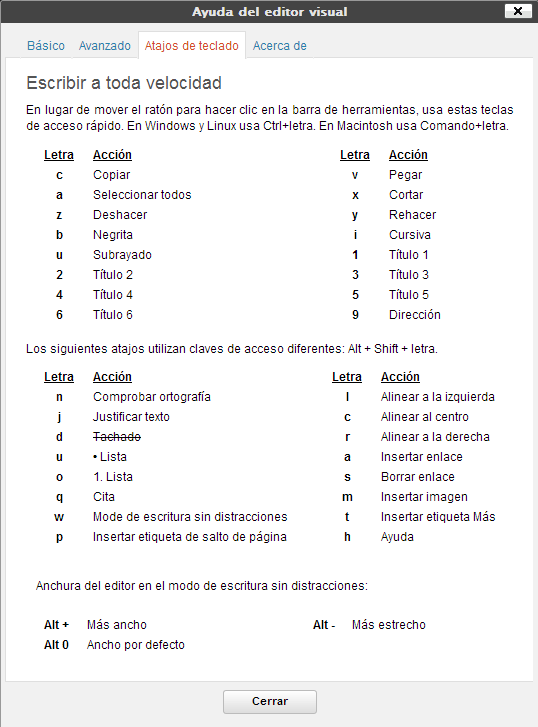
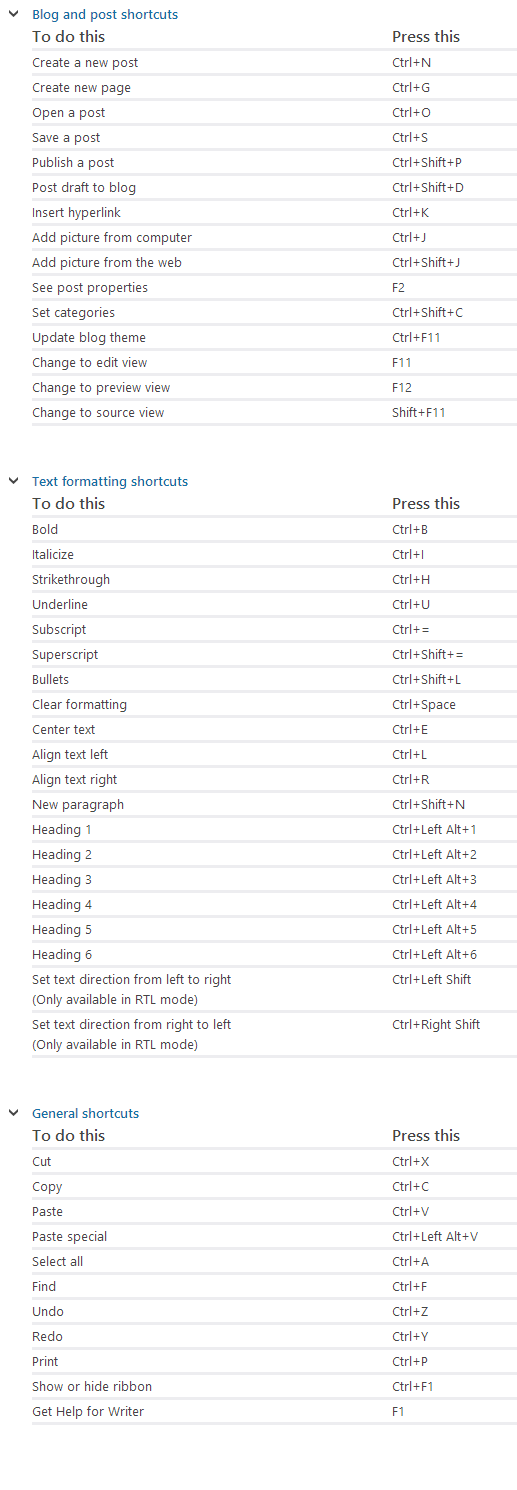
Algunos atajos que sí tienes que memorizar aquí porque no aparecen en la ayuda:
Claro que si en vez de publicar desde el editor de WP usas como yo Windows Live Writer estos atajos te serán de mayor utilidad.
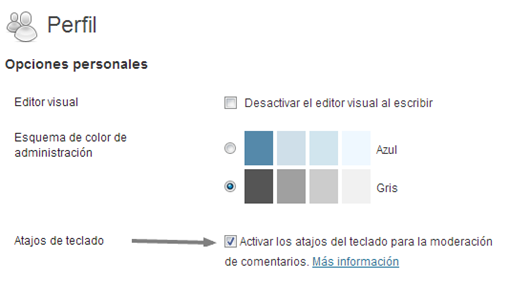
Primero tienes que activarlos en tu perfil
Una vez activados podrás navegar y moderar los comentarios desde tu teclado:
Navegar por los comentarios
Realizar alguna acción con un comentario seleccionado
Para realizar una acción masiva con más de un comentario seleccionado pulsa Shift junto con la tecla correspondiente.
Videotutorial – Atajos de Teclado en WordPress 2.7 | Ayuda WordPress
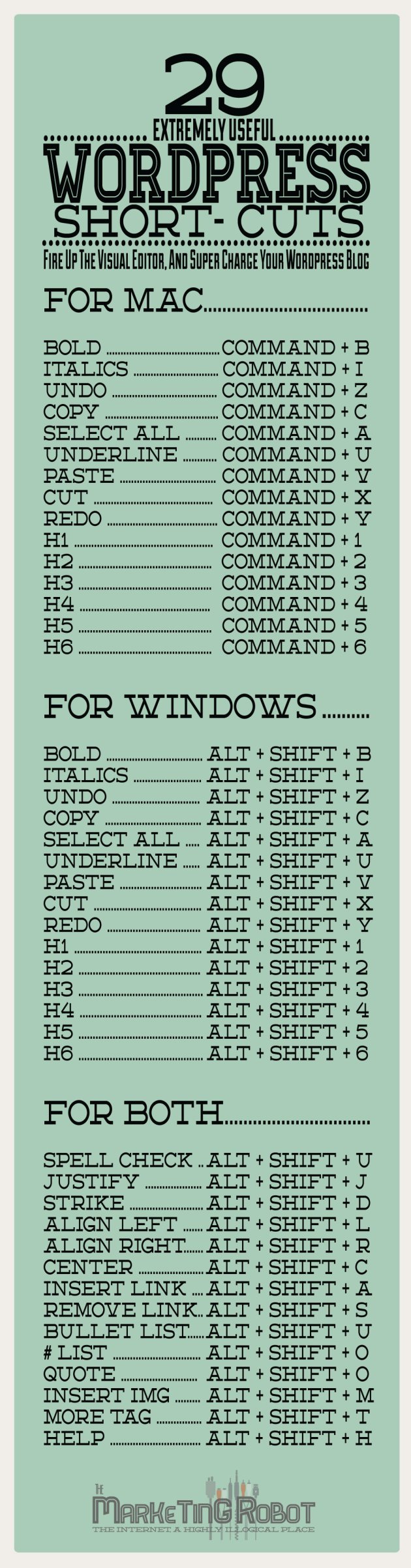
Para Mac
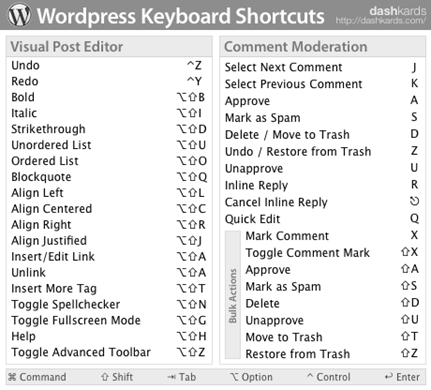
Infografía vía 29 atajos de teclado sumamente útiles para WordPress | GeeksRoom
Plugins:
:wp: => <a href='http://wordpress.org'>WordPress</a>Hay opciones similares que usan shortcodes, probablemente una elección más segura.
Emiliano Pérez escribió este post con el resumen de una ponencia sobre WordPress y SEO. Recoge en 6 pasos el proceso de mejora SEO para sitios que utilizan WP.
La diseñadora Izaskun Sáez le ha dado forma de infografía.

Vía SEO para blogs de WordPress en 6 pasos #infografia #infographic #seo | TICs y Formación


